After you file for unemployment, the waiting begins. Days pass. Then a week. You start wondering whether your application went through, whether something went wrong, or whether your check will ever arrive. The good news is that every state now lets you check your unemployment claim status online — no more sitting on hold for hours or driving to a workforce office. The bad news is that the portals can be confusing, the status labels are often vague, and a single mistake on your application can quietly stall your claim for weeks without you knowing.
This guide covers exactly how to check your claim status online, what each status actually means, and what to do when things go wrong. Whether your claim is pending, under review, or you simply cannot log in to the portal, you will find the answers here. If you have not yet applied, start with our complete step-by-step guide to applying for unemployment benefits so you have a claim to track in the first place.
Why Checking Your Claim Status Matters
Filing your unemployment claim is not the finish line — it is the starting gun. Once your application hits the state system, it enters a multi-step review process. Employers are contacted. Wage records are verified. Eligibility is determined. Any one of these steps can hit a snag, and if you are not checking your status regularly, you might not find out until weeks of benefits have already been delayed.
Here is the reality: state unemployment agencies are dealing with thousands of claims at any given time. They do not call you when something goes wrong. They send a letter — sometimes — and that letter can take a week to arrive. Meanwhile, your claim sits in limbo. Checking your status online lets you catch problems early, respond to information requests quickly, and keep your claim moving forward.
If you are unsure whether you even meet the requirements to receive benefits, read our complete eligibility guide for unemployment benefits first. Understanding the qualification criteria helps you interpret what your claim status actually means and whether you should expect complications.
How to Check Your Unemployment Claim Status Online: Step by Step
Every state runs its own unemployment insurance program, which means every state has its own portal, its own login process, and its own terminology. But the basic steps are the same across all 50 states. Here is how to do it.
📝 Step 1: Find Your State’s Unemployment Portal
Start by visiting your state’s workforce agency website. The easiest way is to search Google for “[your state] unemployment claim status” — for example, “Texas unemployment claim status” or “New York unemployment claim status.” The official state portal will almost always be the first result and will have a .gov domain. Avoid third-party sites that ask for personal information or charge a fee — these are not affiliated with any state agency.
Some of the most commonly used state portals include UI Online (Massachusetts and California), the MyUI+ system (Colorado), the IDES website (Illinois), and the CONNECT system (Florida). Each portal looks different, but they all serve the same core function: letting you view and manage your claim.
🔑 Step 2: Log In With Your Credentials
When you first filed your unemployment claim, you created a username and PIN or password. This is what you need to log in to the portal. If you filed by phone or mail, you may have received your PIN in a separate mailing from the state. If you cannot remember your credentials, every portal has a “Forgot Password” or “Reset PIN” option. You will typically need your Social Security number and some personal details to verify your identity before resetting.
A common frustration: some states lock your account after three failed login attempts. If this happens, you may need to call the agency to unlock it. If you prefer to avoid online portals entirely, our guide on how to file for unemployment by phone covers phone-based status checks as well.
📋 Step 3: Navigate to the Claim Status Page
Once you are logged in, look for a section labeled “Claim Status,” “Benefit Information,” “My Claims,” or something similar. This page will show you the current status of your claim, your weekly benefit amount, your remaining balance, and your payment history. Some states also show a timeline of actions taken on your claim, such as when your employer was contacted and when your wage investigation was completed.
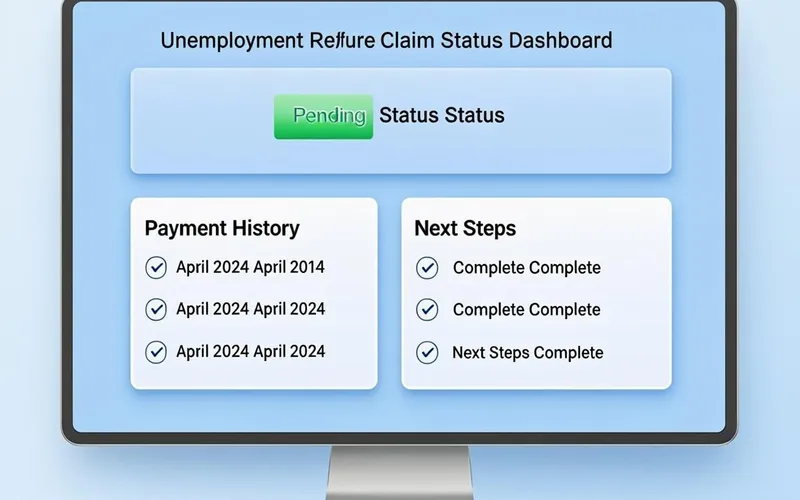
A typical state unemployment portal shows your claim status, payment history, and next steps all in one place.
✅ Step 4: Read and Understand Your Status
This is where most people get confused. States use different labels for the same situation, and the same label can mean different things in different states. The next section breaks down the most common statuses and what they actually mean for your claim.
What Your Unemployment Claim Status Means
Understanding your claim status is the key to knowing whether you need to take action or simply wait. Here are the most common statuses you will encounter, what they mean, and what you should do about each one.
Common Problems When Checking Your Claim Status
The online system is not perfect. Here are the most common problems people run into when trying to check their unemployment claim status, and how to solve each one.
🔒 Cannot Log In to the Portal
This is the number one complaint. You try to log in, and the system says your credentials are invalid. Or you try to reset your password, and the security question does not match what you remember entering. The fix depends on the state, but here are the general steps: first, try the password reset option. If that does not work, clear your browser cache and try a different browser. Some state portals are notoriously finicky with certain browsers. If you are still locked out, you will need to call the unemployment agency. Yes, the hold times can be brutal — sometimes over an hour — but a phone agent can reset your credentials on the spot.
⏰ Claim Stuck on “Pending” for Weeks
A pending claim is normal for the first two to three weeks. But if your claim has been pending for more than four weeks without any change, something is likely holding it up. The most common culprits are: your employer contested the claim, there is a discrepancy in your reported wages, the state needs additional documentation from you, or your claim was flagged for identity verification. Check your portal for any messages or alerts. Also check your mail — the state often sends requests for information by postal mail, and missing those deadlines can stall your claim indefinitely.
Many of these delays are caused by errors that could have been avoided. Our article on unemployment application mistakes that delay your claim details the most common errors and how to fix them before they cause problems.
⚠️ Status Changed Unexpectedly
Sometimes your claim status changes from “Approved” to “Under Review” or from “Paid” to “Pending.” This can be alarming, but it is not always bad. A status change can happen when: your employer files an appeal after your claim was initially approved, the state is conducting a quarterly review of your claim, or you reported earnings during certification that need to be verified. If the status change comes with a notice or letter, read it carefully and follow the instructions. If there is no explanation, call the agency.

Common claim status problems and their solutions — most issues can be resolved within a few days if you take action quickly.
State-by-State Portal Guide
While every state has an online portal, the names, URLs, and features vary widely. Here is a quick reference for some of the most populated states. For states not listed here, search for “[your state] unemployment claim status” and look for the official .gov website.
| State | Portal Name | Key Feature |
|---|---|---|
| California | UI Online | Real-time status updates and messaging |
| Texas | Texas Workforce Commission | Payment status tracker with direct deposit info |
| Florida | CONNECT | Claim status, certification, and appeals in one portal |
| New York | My Online Services | Detailed claim history and payment schedule |
| Illinois | IDES Claimant Portal | Status updates and document upload |
| Pennsylvania | PAT (Pennsylvania Teleclaims) | Online and phone status options |
| Ohio | Ohio Unemployment | Claim status with employer response tracking |
If you have not yet applied for unemployment in your state, the step-by-step guide for applying for unemployment online covers the exact process for every state, including direct links to each portal.
When Online Is Not Enough: Other Ways to Check Your Status
The online portal is the fastest way to check your claim status, but it is not the only way. If you cannot access the portal, or if the information online seems outdated or incomplete, you have other options.
📞 By Phone
Every state unemployment agency has a toll-free phone line for claim status inquiries. Call the main number for your state’s workforce agency, navigate the automated menu, and select the option for claim status. Some states have a dedicated automated phone line that gives you your status without speaking to a representative — just enter your Social Security number and PIN. The downside is that hold times can be very long, especially on Mondays and Tuesdays. The best times to call are Wednesday through Friday, early in the morning right when the lines open.
🏛️ In Person
Some states still allow walk-in visits to American Job Centers or workforce offices. This can be a good option if your claim has a complex issue that cannot be resolved online or by phone. Bring your government-issued ID, your Social Security card, and any correspondence you have received from the unemployment agency. Not all offices handle unemployment claims, so call ahead to confirm before making the trip.
📬 By Mail
This is the slowest option and should only be used as a last resort. You can send a written request for your claim status to your state’s unemployment agency. Include your full name, Social Security number, and a self-addressed stamped envelope. Expect a response in two to four weeks. Most states prefer that you use the online portal or phone system, and some may not respond to mail inquiries at all.
How to Protect Your Claim From Fraud
Unemployment fraud is a serious problem, and checking your claim status regularly is one of the best ways to protect yourself. If someone files a fraudulent claim using your identity, the only way you will know is if you check your status and see a claim you did not file, or if you receive a letter about benefits you never requested.
Here are a few red flags to watch for: your claim status shows payments you did not receive, your portal credentials have been changed without your knowledge, or you receive a 1099-G tax form for benefits you never collected. If you notice any of these signs, report it immediately through your state’s fraud hotline and the Department of Labor’s identity theft reporting page.
If you discover that you were overpaid benefits — whether due to fraud, a state error, or a mistake on your certification — you need to act quickly. Our guide on what to do if you were paid too much in unemployment explains how to handle overpayment notices, set up repayment plans, and request waivers.
Tips for Keeping Your Claim on Track
Checking your status is important, but it is only one piece of the puzzle. Here are some practical tips to make sure your claim moves smoothly from filing to first payment and beyond.
Understanding what can disqualify you from receiving benefits is also important. Some actions — like refusing suitable work without good cause or failing to meet job search requirements — can stop your payments even after your claim has been approved. Our article on what can disqualify you from unemployment benefits covers the full list of disqualifying factors so you can avoid them.
Frequently Asked Questions
The Bottom Line
Checking your unemployment claim status online is not optional — it is a critical part of making sure you receive the benefits you are entitled to. The process is straightforward: find your state portal, log in with your credentials, and check your status regularly. But the real value comes from understanding what each status means and knowing what to do when something goes wrong.
A pending claim is normal. A denied claim is not the end of the road. A stuck claim usually has a fixable reason behind it. The key is to stay informed, respond to requests quickly, and never assume that silence from the agency means everything is fine. Check your portal weekly, read every notice carefully, and take action when something does not look right. Your benefits depend on it.
If you are still in the early stages of the process, the complete step-by-step guide to applying for unemployment covers everything from gathering your documents to submitting your application. And if you are already receiving benefits, make sure you understand the certification process to keep your payments coming without interruption.

Wasim Akram
Verified AuthorFounder & Lead Researcher, UnemploymentBenefitsCalculator.com
Wasim personally researches, writes, and reviews every article on this site. His expertise spans unemployment benefits policies across all 50 U.S. states, drawn from systematic research into state workforce agencies and Department of Labor guidelines.